Personal Projects Site
So the goal with this one is to make a website to show off personal projects. This will have a few sections, from hosting to actually building the website, maybe some DNS stuff idk.
Cloudflare
I will be making use of Cloudflare's offerings. This is for a few reasons - by no particular order of importance: - It's free (up to a point, you can check on their website). - I actually like cloudflare, they seem pretty cool. - Not amazon or google, they're shady af. - Cloudflare sells DNS names and handles them for you. - Cloudflare has a github-pages-like thing where they'll host some content for you. - If you don't want cloudflare hosting your stuff they can just serve as a reverse-proxy.
I won't be posting screenshots from my dashboard cuz it has some personal data I'd rather not share, and it's fairly easy to use so if you're doing this with the goal of replicating my efforts it shouldn't be hard. It really does kinda guide you through it initially too.
After I did the initial setup for the DNS stuff and created the 'website' thing on the dashboard, I went to do the pages stuff. Like I said before it is kind of similar to github pages if you've ever used that, and you can even link to a github/gitlab repo as the source.
Eventually I might change to a regular reverse-proxy setup, this website won't see much movement at all and it can easily be hosted on a rpi for basically no cost, and then you'll have a local backend and essentially just full control. Only reason I'm not doing it yet is because of router and ISP reasons making it a pain in the ass to open ports and keep them open reliably.
Pages is in this part of the dashboard:
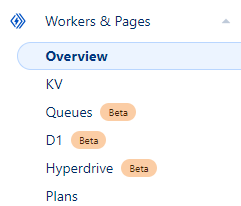
Workers are a thing too and apparently you can even setup a backend on cloudflare itself, but I haven't explored that and might never do.
After you've created a page it will ask you whether you want to upload contents via github/gitlab or upload them manually, but eventually you'll want to automate it. I have my local git server and don't want to use github/gitlab, so we'll be going with the automation approach.
That means you use Wrangler. That's cloudflare's CLI tool for managing pretty much everything regarding your cloudflare account. That includes the pages projects. There's an install guide for wrangler. I used npm - so to run commands I just do npx wrangler whatever (I will omit npx going forward).
To change the contents in a pages project, you'll need to login with wrangler. So far I've only done it with the basic command wrangler login, it opens up the browser and does all this funky stuff, at the end of which wrnagler has the necessary credentials and permissions to perform actions on your account.
This of course is not great for automation, and unusable for a headless setup like I have on my server, so we need to set up proper authentication that wrangler can use to run the upcoming commands without us having to login. This is briefly explained in the Run Wrangler in CI/CD, and the variables themselves are properly documented in System environment variables.
For creating a token you need to set the Pages permission:
 As you create it it will show you the key, let you copy it, but never show you the key again. You can't access it anymore on the website. I suppose this makes sense if you manage a lot of stuff and have a lot of tokens registered, someone getting access to your browser would compromise all of them whereas this way only the one you just created would be compromised. Lastly, you'll get the account ID.
After that the pages commands are pretty much all there is. to list the projects on your account you can use
npx wrangler pages project list, and to push changes to a pages project you do
npx wrangler pages deploy <directory> --project-name <cloudflare-project-name>.
Actually surprisingly simple. Didn't need to be any more complicated and it's not.
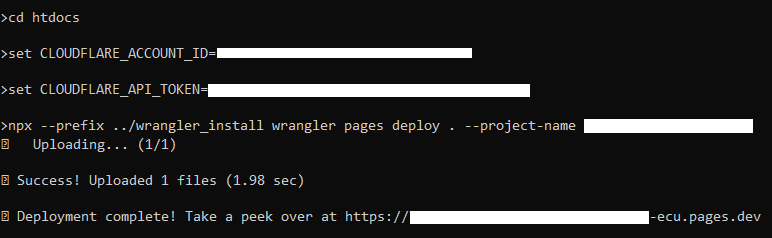 Later I'll write a script to do this and I think I'll use a couple
 .gitignore'd files with the account id and the token.
One thing to point out is that running wrangler pages deploy inside a git repository will mess things up - it uses git in the background, and when that detects it's inside a repo already, stuff gets funky. It will still push the folder you tell it to, and it seems to generally leave that repository untouched, but it will take the branch name and commit message from the parent repo. You can force it to behave by using --branch, --commit-message and --commit-dirty:
 Dashboard:
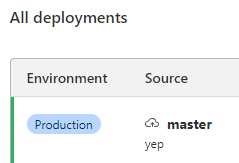 The dirty just makes it so if your repository has uncommitted changes wrangler won't complain.
For further down the line if/when I do the reverse proxy stuff, I also found Add your domain to Cloudflare which is pretty neat. Perhaps you might want to read How Cloudflare works too if you're not too familiar with concepts like DNS and reverse-proxying.
Markdown to HTML
This isn't necessarily an easy task. At first I figured I'd write a parser. "How hard can it be?". As it turns out, quite a bit. Well it wouldn't be difficult per-se, just incredibly laborious. Have a look at the spec for Github Flavored Markdown..
Ye so I'm not spending a whole week writing a parser for that. The other problem would be LaTeX. If you don't know what LaTeX is, it's the thing that allows me to write stuff like \nabla \cross E = -\dfrac{\part B}{\part t} in text. It's great once you get used to it, but I also looked into how hard that'd be to parse, and my conclusion was that you'd have to make a TeX engine and good luck even understanding how that shit works. The guy who made that, he wrote it in a language he created, a language which is pretty much only used for that - so you can imagine how obscure that whole shit is.
So a better solution is needed. And that solution comes in the form of Pandoc. You can read through it but it's basically a tool to convert from one thing to the other thing, and in our case thing1 is md and thing2 is html. So I'm gonna try that now.
The cleanest I've ever seen LaTeX look however has been with mathjax, that's what they use on the math stackexchange and on the math overflow website. I'd like to get as good a result as possible. But I digress, let's start by getting a result.
Enter Pandoc
Well first off, they've done here something I have seldom seen people do:
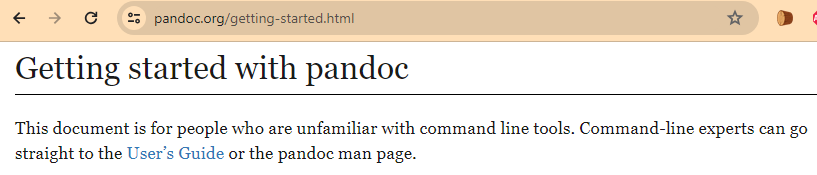 Helping me not waste my time.
So I already like them.
Helping me not waste my time.
So I already like them.
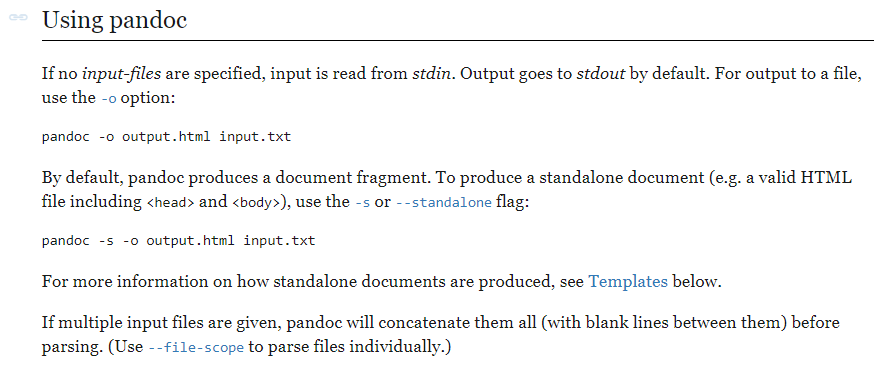 God damn look how clean and concise this documentation is. Fucking gold. I hope to reach these heights one day.
I'll be using this very document you're reading to test this out.
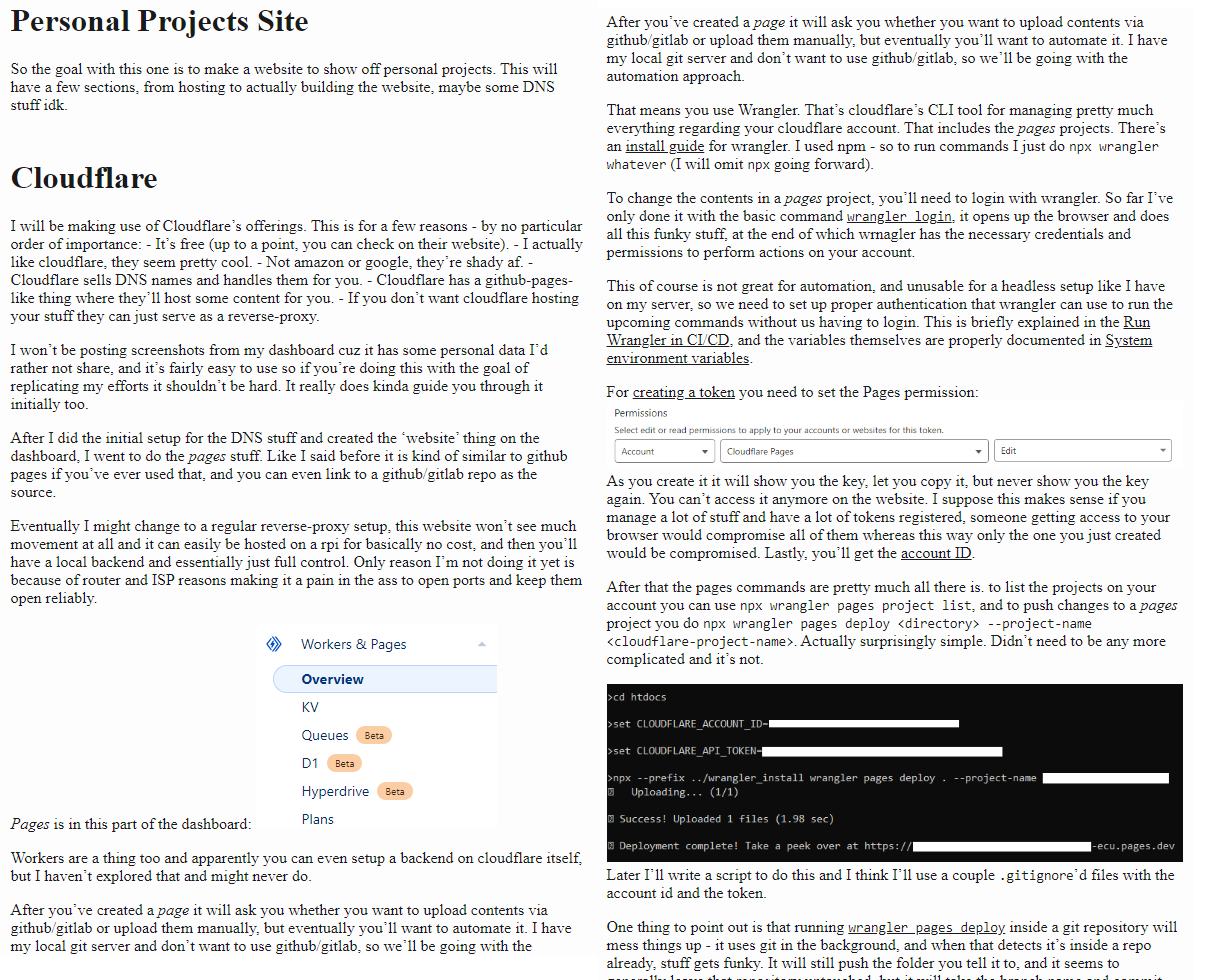 And right off the bat I can't say it looks excellent but it's still better than ms word. (I put them side-by side, it is otherwise a really thin strip in the middle of the screen).
We do however have this option:
 Which is pretty good and we might want to start work on it.
We did however get an error:
 Which is a bit weird of an error but I suppose that depends on what engine we're using.
Anyway remember how I mentioned mathjax earlier, guess what:
Which is a bit weird of an error but I suppose that depends on what engine we're using.
Anyway remember how I mentioned mathjax earlier, guess what:
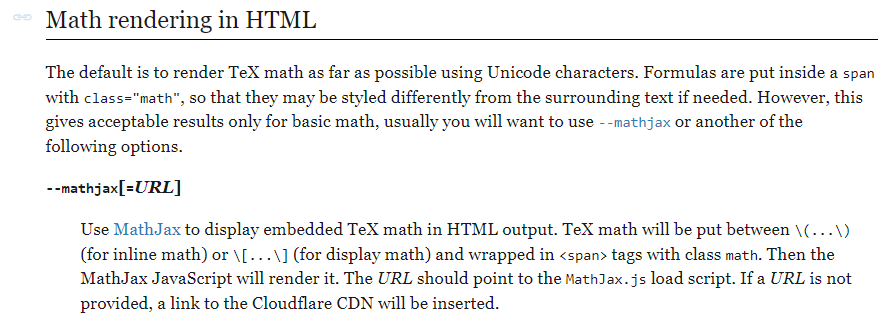 Hell yeah babyy.
So that now runs:
Hell yeah babyy.
So that now runs:
 And it looks fuckin spectacular as well. The html/css rendering is OP. Even SVGs don't do subpixel I'm pretty sure, so it's actually unbeatable.
This is fast as hell too btw, the command takes less than half a second to run so it'll be fantastic on the server. What an amazing facility.
Let's see what happens if I just take my typora theme and drop it in without any changes..
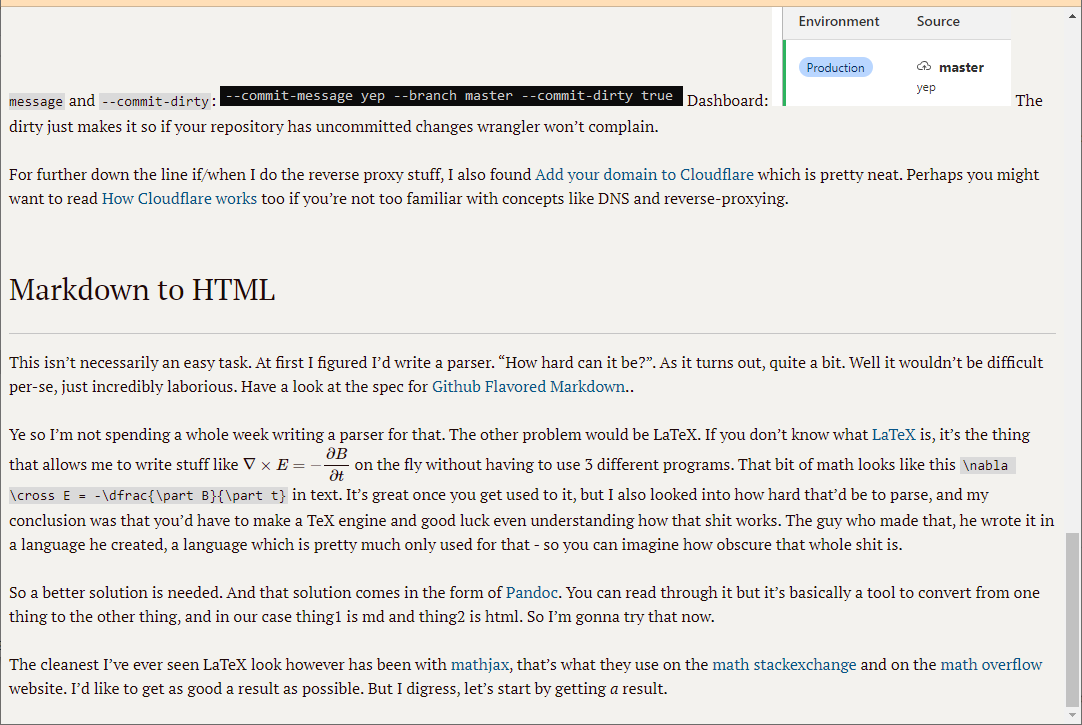 Ok well a lot of it just straight up works. Width is 100% tho, and images are still doing the "I refuse to go on my own line" thing. I could set them to
 display: block, but upon further inspection it seems it's really just pandoc using the normal markdown rules (where if you want a linebreak you need to append 2 spaces to the previous line). That can be fixed with an extension:
 And that worked.
The full line is now:
pandoc input.md -s --from=markdown+hard_line_breaks --mathjax --css=stylesheet.css -o output.html
So I suppose that's done. There may be some things which are broken, but the main ones I use clearly aren't. I may make a second pandoc section for code highlighting and stuff, but I may just forget and never again think of it because it's rare that I actually use the functionality. I typically just use images because large sections of code/data can be pasted without taking a large amount of space, the user can then just zoom in - I don't particularly care for whether they can copypaste, and most often I use it for data rather than code.
Git Hooks
So now the goal will be to have git hooks on the server and automatically run pandoc and wrangler deploy when changes are made to a project that is meant to be documented on the website.
Git hooks are essentially just a thing that runs when you push to the server:
Like many other Version Control Systems, Git has a way to fire off custom scripts when certain important actions occur. There are two groups of these hooks: client-side and server-side. (...) server-side hooks run on network operations such as receiving pushed commits. You can use these hooks for all sorts of reasons.
The hooks are all stored in the
hookssubdirectory of the Git directory. In most projects, that’s.git/hooks. When you initialize a new repository withgit init, Git populates the hooks directory with a bunch of example scripts, many of which are useful by themselves; but they also document the input values of each script. All the examples are written as shell scripts, with some Perl thrown in, but any properly named executable scripts will work fine – you can write them in Ruby or Python or whatever language you are familiar with. (...)To enable a hook script, put a file in the
hookssubdirectory of your.gitdirectory that is named appropriately (without any extension) and is executable. From that point forward, it should be called. We’ll cover most of the major hook filenames here.
That's pretty cool. A server-side hook can be a pre-receive, update or post-receive hook. The first two are for arbitrating whether the push is allowed to go through, the last is for doing actions after it has. So for our current purposes we'll be using post-receive hooks.
Only problem now is how we manage hooks on all different projects in a clean way. I'll be approaching this with a 'dispatch'-style system, for lack of a better name.
Essentially I'll have 3 things:
- A script that gets symlinked into the hooks directory of every project.
- Configuration file that maps [project, hook type] pairs to any scripts that the user may register.
Environment variable is set to the location of the configuration file, and script then accesses it to check.
The goal is to have the possibility of multiple target scripts for each [project, hook type] pair, or a single target script for multiple projects (without having to manually manage all that with symlinks which would get messy pretty quickly).
Git docs are however pretty shitty about explaining any of this properly. Idk what's so hard about giving fucking examples in your documentation and explaining what shit actually is, but people just can't quite seem to get the hang of writing decent documentation.
Anyway Understanding Git Hook - post-receive hook gives a proper example of how this might be used. I don't actually know what these 'refs' look like, because it's not mentioned in the hooks docs - I guess people are just supposed to guess/figure out what internal designations for git shit look like. So that's what Imma do, figure it out.
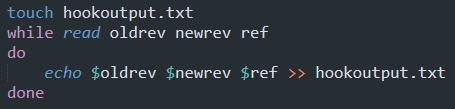
So I created a test.git repo and cloned it into test, then I wrote this into post-receive:
 And tested out a push:
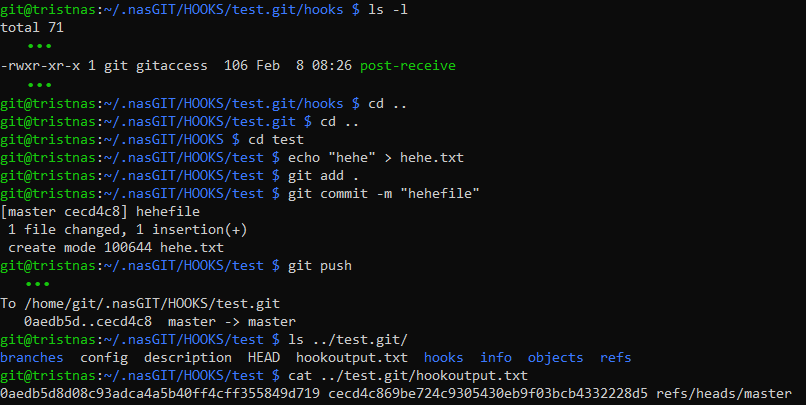 Ok so that
 0aedb5d in the push command is what's at the start of oldrev and likewise for newrev. This is the commit id it seems, and that's the value of the hash of the things. We can then run git diff between the 2 hashes in the bare repo to see changes:
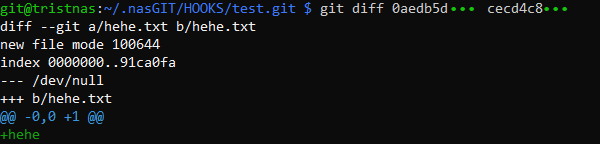 So that's why those were useful.
 diffwas not mentioned in the docs.
You can use the --name-only option to list only the names of the added/modified/deleted files.
The --name-status one is more useful however since then you know exactly how that file is affected by the commit.
This will be useful here in a minute when we want to parse stuff.
It's worthwhile to note that we can use pretty much any script type for this. We can use a python script as long as we specify it with the #!/usr/bin/python shebang. Python might be better here - the user may push multiple commits at once and it would be easier to track added/deleted files with a python dict.
First we need a way to get the files though. This is a bare repo we're working with so it's not straightforward. After a very long search I found this answer which seems to suggest checking out only a select file/directory from within the bare repo. Let's try it.
 It works. I am very happy. This took me way longer than it should have. It works for multiple files, and dirs as well.
So now let's do the hook dispatch thing finally.
We'll need a config file so let's establish that first, entries will look something like this:
post-receive "test.git" "path/handler.py"
This way we get 2 spaces that separate the type of hook, the path for the hook's source repository, and the handler path.
This should be easy enough for any script to parse. In bash we can just grep to find handlers for a [hook type, repository] combo, though either care should be taken not to repeat repo names or to always use absolute paths (I much prefer the first option).
So yeah we just create this config file and assign a system variable to it like GIT_HOOK_DISPATCH_LIST or something.
As for the main script, I did a bash version:
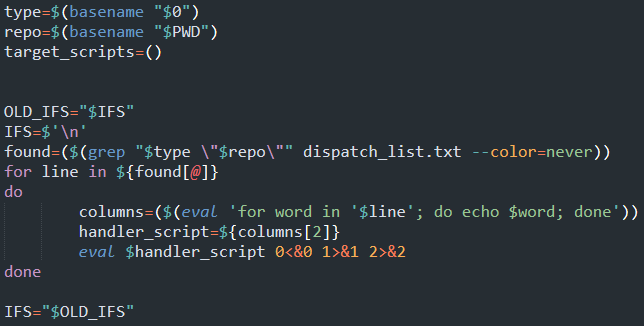 But bash really is a shitty nasty language. It's not even really a language, in fact the best description I've read for it has been "the accidental syntax of Bash".
Bash is a user interface. The fact that you can string together words and symbols and make logic happen is basically just back-porting advanced user functionality into an existing interface.
The problem with the above is that if we actually had multiple scripts to run, it wouldn't work. The input provided by git's calling process would be exhausted on the first eval and the next ones would be dead. I didn't think of this until I was done.
So I'm now doing it in python because fuck bash. And also the dispatch list is now json.
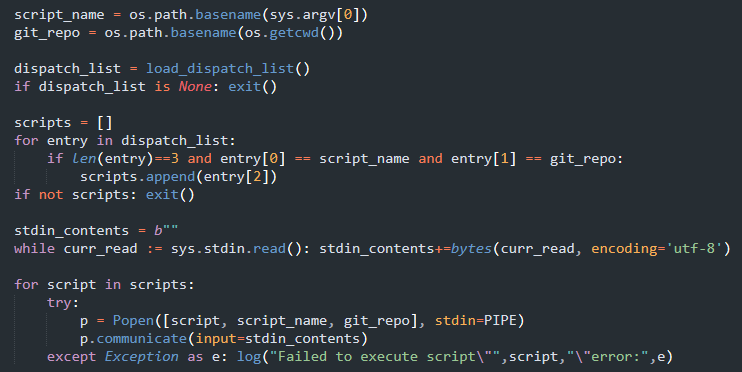 Log writes to
 GIT_HOOK_DISPATCH_ERR. It can't use stdout or stderr because those will be output to the git client.
Also in the meantime I switched to using CSV for the dispatch list because it's much more robust than json. If a line is bad it'll still parse but we can just skip it during error checking - as opposed to json where parsing fails entirely if a single extra comma is found in the wrong place.
Well another problem arises. It seems git starts a stripped shell for running the hook scripts. Environment variables are not available. Best solution is perhaps to store all this hook stuff in the git user directory and just reference it directly from the script. This is what it ended up looking like:
 Perhaps I should make those absolute,
 ~s can be a bit wonky.
Final result:
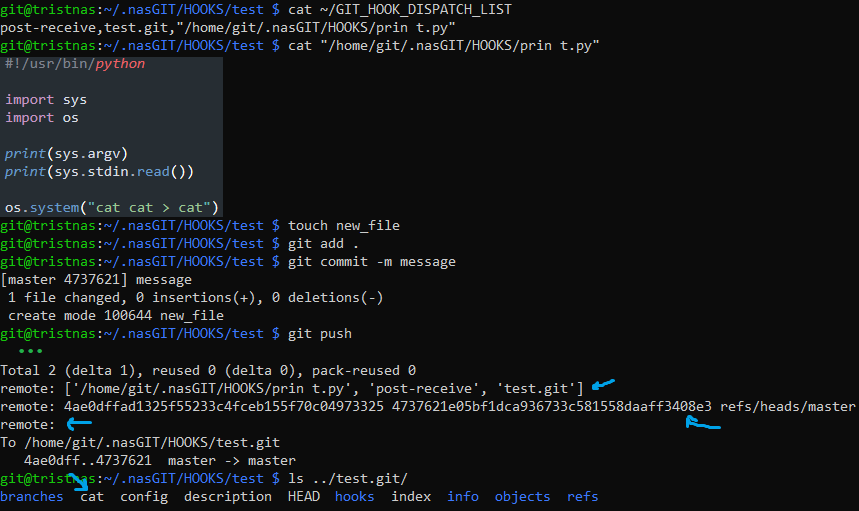 It's cool that the message gets echoed back to the user like that.
Putting it All Together
So now we put it all together.. put the script in hooks, in it we run diff, we keep track of what files changed, filter out the files that don't belong to the markdown stuff, check the files out to a temporary directory, generate the html from the markdown (I'm also thinking of optimizing the images and making thumbnails), write it to the htdocs directory and finally wrangle it onto Cloudflare Pages. Lots of stuff but not that much complexity.
First I'll try to provide you some idea of my strategy so my code doesn't look completely alien.
Essentially what we get in the hook (oldrev, newrev and ref) is a series of commits that come with the previous commit on that branch. So I'll be filtering these commits to the main branch only and then diffing the previous state and the last commit to get the changed files, I'll use --name-status to get this in a simple format:
 The the meaning for the letters on the left can be found in the
 --diff-filter documentation:
 The copied/renamed entries have 2 files, looks like so:
  . The numer is the 'likeness', first name is source, second name is destination. Same for copy, though I wasn't able to get git to detect a copy for testing.
I'll really just have that boiled down to an added/modified group and a deleted group. Easier to deal with and we won't be doing this frequently enough for the performance penalty to matter.
. The numer is the 'likeness', first name is source, second name is destination. Same for copy, though I wasn't able to get git to detect a copy for testing.
I'll really just have that boiled down to an added/modified group and a deleted group. Easier to deal with and we won't be doing this frequently enough for the performance penalty to matter.
Another caveat is the first commit on the master branch showing oldrev as all 0s:
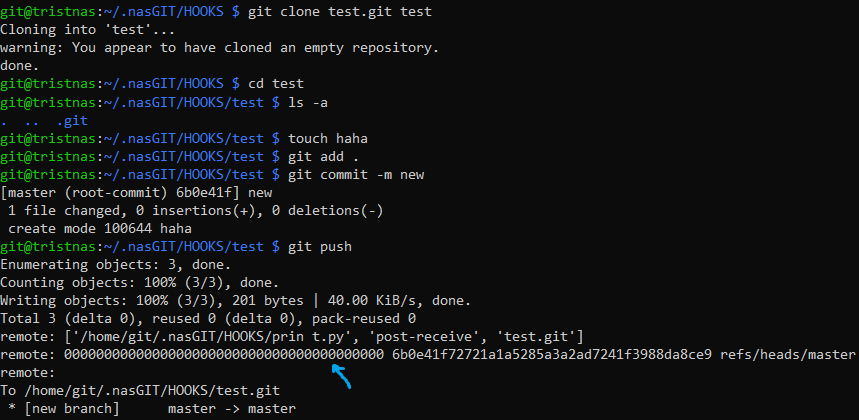 That will not work with
 git diff since for a bare repo you need 2 hashes. How to get Git diff of the first commit? has a couple excellent answers on how to do it. I'll be using git hash-object -t tree /dev/null for future-proofing.
One advantage to this is the ability to call the script manually with the null hash and the current hash for building the full contents (instead of just the new ones) - this can be used for a first setup.
If you want to see all the commit hashes for a certain branch, use git log --pretty=format:"%H" <branch>.
For merge/squash merge/rebase/whatever, none of our workflow changes, the commits are transferred to the master branch and we can just act as if they were made there in the first place.